Chances are your employees already use AI. The question is whether you know how they use it, and with what data.
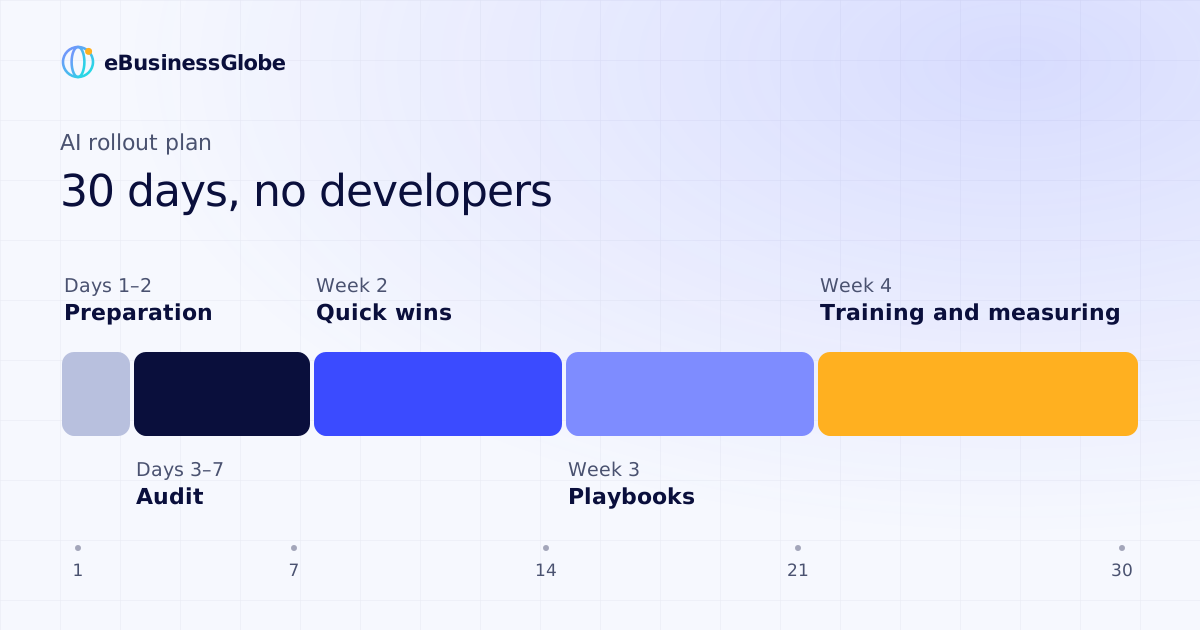
What follows is a 30-day plan, broken down week by week: from auditing your processes to measuring the effect, with templates, tools and the mistakes companies most often trip over. You won't need developers for any of it. At the end, we'll be candid about where you will.
Why so many AI pilots fail to pay off
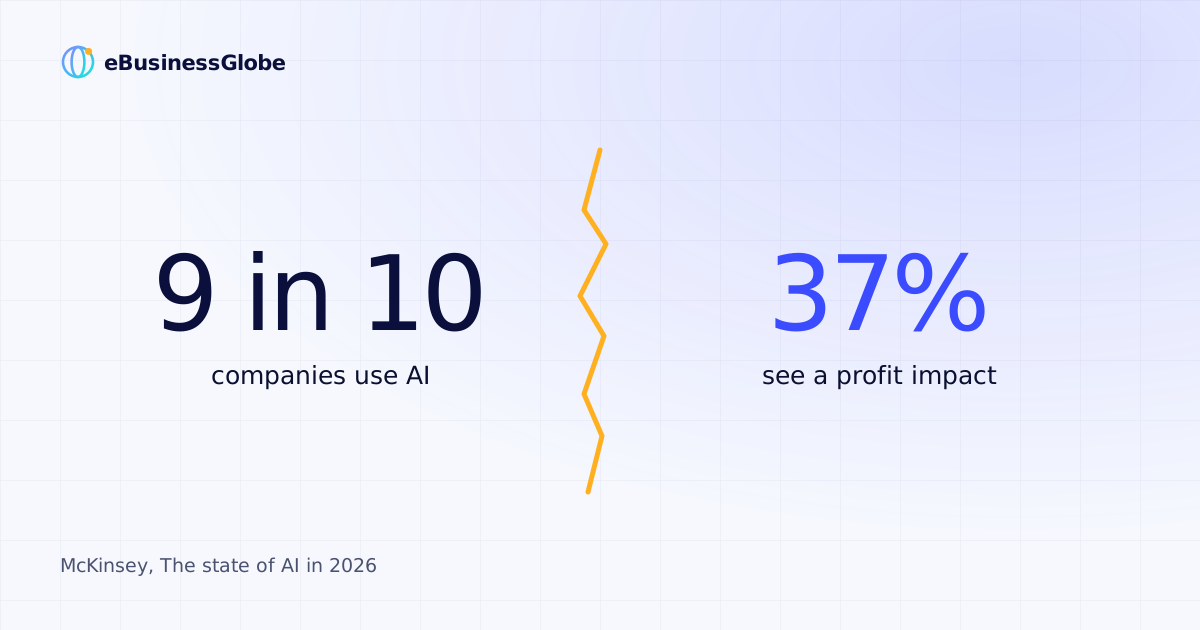
In the summer of 2025, researchers at MIT's NANDA initiative published a report on how companies are adopting generative AI. The headline finding: about 95% of the organizations in their sample had seen no measurable impact on profit from their pilots. The cause, according to the authors, was not the quality of the models. It was the way companies deployed them: tools that never became part of daily work and were never adapted to the company's processes.
Employees, meanwhile, stopped waiting for permission long ago. According to Microsoft and LinkedIn (2024), 75% of knowledge workers use AI at work, and 78% of them bring their own tools. Only 39% of those users had received AI training from their company. In 2025, BCG surveyed more than 10,600 workers across 11 countries: 54% said they would use AI even if their employer hadn't authorized it.
That leaves an owner with two jobs. The first is to turn chaotic usage into managed usage, with rules, controlled data and measurement. The second is to pick the processes where AI will pay off in money or hours, rather than simply "trying AI."
The plan below covers both, and it fits into 30 days.
Before you start: days 1–2
Without preparation, the plan will most likely stall in week two. You need three things.
An owner. One person for whom the rollout is a task with a deadline, not something to get to "when there's time." This doesn't have to be someone from IT. It's better if it's someone who knows your processes and is respected by the team.
Business accounts. Company data goes only through business or enterprise tiers of AI services (for example, ChatGPT Business or Enterprise, Claude Team, or enterprise offerings from regional providers where data residency matters), where data retention and training on your data are governed by contract. Work data in personal free accounts is off-limits.
A one-page data rule. What must never be sent to AI under any circumstances: customers' personal data, passport details, banking details, counterparties' commercial terms, passwords. This rule goes into effect on day one, not after the first leak.
Why it matters shows up in Cyberhaven's 2024 data: 27.4% of the data employees enter into AI tools is sensitive (up from 10.7% a year earlier), and 73.8% of workplace ChatGPT usage went through non-corporate accounts. Depending on where you operate, a leak of customer personal data can also mean regulatory fines. Under the EU's GDPR, the most serious violations can cost up to €20 million or 4% of worldwide annual turnover, whichever is higher.
Week 1 (days 3–7): audit your processes and record the baseline
The goal this week is to find two or three processes where AI has the best chance of paying off, and to document how they work today.
Step 1. List the processes. Ask department heads to write down the tasks that recur every day or every week. The list usually runs longer than you'd expect: answering routine customer questions, commercial proposals, meeting minutes, reports, product descriptions, first-pass résumé screening, document reconciliation.
Step 2. Put a price on each one. A simple formula:
Monthly cost of a process = frequency per month × time per run × hourly cost of the employee.
Step 3. Filter. For each candidate, rate two more parameters: the cost of an error and the availability of data. Good candidates are frequent, repetitive, have clear inputs and tolerate the occasional error. Rare, high-risk work stays with people. Here is how a typical shortlist plays out:
- Draft commercial proposals. High frequency; medium cost of error, since a manager reviews every proposal; templates and a price list already exist. Verdict: take it.
- Meeting minutes and follow-up tasks. High frequency; low cost of error; meeting recordings exist. Verdict: take it.
- Answers to routine customer questions. High frequency; medium cost of error; an FAQ and a price list exist. Verdict: take it, with human review.
- Tax calculations and legal opinions. Low frequency; high cost of error; scattered data. Verdict: leave it to people.
Step 4. Record the baseline. For the processes you've chosen, capture today's numbers: how much time they take, how many errors and redos they produce, how fast responses go out. Without this reference point, a month from now you won't be able to prove the effect, to yourself or to your team.
A worked example
A hypothetical example. All figures are assumptions.
Your managers prepare 40 commercial proposals a month, and each takes 1.5 hours: 60 hours in total. Suppose AI drafts each proposal from a template and the price list, and a manager reviews and finalizes it in 0.5 hours. Then 40 proposals take 20 hours instead of 60, freeing up 40 hours a month. At an hourly cost of $10, that's $400.
One important caveat: saved hours turn into money only if the freed-up time goes toward something useful, such as more calls, more deals or less hiring. If it doesn't, the gain stays on paper. Decide in advance where those hours will go.
Week 2 (days 8–14): quick wins
The goal is to launch the chosen scenarios on off-the-shelf tools and test them with a pilot group of three to five people.
Here's what can usually be done without developers:
- Drafts of proposals, emails and descriptions. Tools: ChatGPT or Claude on a business plan. How it works: a prompt template plus the attached price list and examples.
- Meeting minutes. Tools: the transcription built into your video-conferencing service, or a dedicated transcription app. How it works: recording → transcript → summary and action items.
- Answers based on internal documents. Tools: Projects in Claude or ChatGPT, loaded with your policies. How it works: an employee asks a question, and the AI answers with a reference to the source document.
- Simple "if this, then that" workflows. Tools: no-code platforms such as n8n or Make. How it works: a new inquiry arrives → AI drafts a reply → the manager gets a notification.
- AI inside your CRM. Tools: the AI features built into your CRM. How it works: call summaries, auto-filled deal records, message drafts.
Three rules for this week:
- One scenario, one owner. Someone in the pilot group is responsible for making the scenario work and collecting its errors.
- A prompt library. Prompts that work don't live in someone's chat history. They go into a shared document, together with a sample of the output.
- An error log. Every wrong AI answer gets recorded: what was asked, what it answered, what the correct answer was. After a week, this log is your main input for the playbook.
Week 3 (days 15–21): playbooks
The goal is to turn an experiment into a rule that any employee can follow, not just the enthusiasts in the pilot group.
The playbook for each scenario fits on one page and answers five questions:
The general principle: anything that touches money, a client or your reputation is checked by a person before it goes out. Loosen that control only when several weeks of the error log show that the scenario is stable.
This same week, update your data rule with what you learned in practice. It's often a type of document that unexpectedly turned out to be sensitive.
Week 4 (days 22–30): train the team and measure the effect
Training
A common mistake is a company-wide lecture on "AI in general." A week later, little of it shows up in anyone's work. What works is training on each participant's own tasks: everyone comes in with a real process and leaves with a working scenario.
The data points the same way. In BCG's 2025 study, only 36% of employees said they had been adequately trained to work with AI, while those who received five or more hours of training, especially in person and with a coach, were significantly more likely to become regular users.
A practical structure for a 30-day plan:
- Using AI safely: the data rule, business accounts, typical mistakes. Short, but mandatory for everyone.
- Practice on the department's own tasks: members of the pilot group show colleagues their scenarios on real examples.
- Your first scenario: every participant sets up one scenario for their own work and hands in the result.
- Cheat sheets: the prompt library and one-page playbooks for each department.
The training metric isn't "everyone attended." It's the share of employees who are using the scenario in their work two to four weeks later.
Measuring the effect
On day 30, compare the chosen processes against the baseline:
- Time spent: hours per month, before and after.
- Quality: the share of outputs that had to be redone.
- Speed: time from request to result (a reply to a client, a proposal, meeting minutes).
- Adoption: the share of employees who actually use the scenario.
- AI errors: the number of entries in the error log, and the trend.
Then make one of three decisions for each scenario: scale it to other departments, refine it for another month, or stop it. Stopping is a perfectly good outcome: money and time stop flowing into something that doesn't work.
The most common mistakes, and how to avoid them
- The pilot for the pilot's sake. A polished demo with no impact on processes or money, which is exactly the picture the MIT report describes. Avoid it by choosing processes with the cost formula and defining the metric in advance.
- No baseline. You have nothing to prove the effect with, so decisions get made on gut feeling. Avoid it by never skipping week one.
- Company data in personal accounts. Leaks of trade secrets and personal data, and possible fines. Avoid it with business accounts and a data rule from day one.
- Automating chaos. AI speeds up a process that already works badly. Avoid it by describing the process as it is first, and cutting the unnecessary steps.
- AI without human review. A single error gets replicated across every reply to customers. Avoid it with mandatory review written into the playbook.
- Training as a lecture. Knowledge without skill, forgotten within a week. Avoid it with practice on real tasks, ending with a working scenario.
- Expecting "10x." Disappointment, and AI abandoned after the first month. Avoid it by setting goals in hours and percentages for a specific process.
Where you will need specialists
The plan above genuinely works without developers, at the level of off-the-shelf tools and individual employees. But some jobs can't be done with ready-made services:
- integration with your CRM, ERP and accounting systems, telephony and messaging apps, so that AI works directly inside your systems;
- a private deployment, with AI running on the company's own servers, for when data can't be sent to external services;
- a company knowledge base that AI answers from, citing its sources;
- digital employees across several departments at once: sales, marketing, finance and document workflows.
If you'd like help
At eBusinessGlobe, we offer two products for different needs.
Corporate training, "AI for Your Team," for companies that want their people to work with AI on their own. One to two days of training, online or on-site, built around your company's real tasks, followed by 30 days of implementation support. Available in any of 11 languages. Pricing: $3,000–10,000 per company, depending on headcount, languages and format.
Company-wide AI transformation, for companies with 50+ employees and annual revenue of $2–3 million or more that need AI across all their core processes. It starts with an AI scan: a map of where time and money are being lost, and a rollout plan with a payback estimate. It includes a company knowledge base; digital employees for sales, marketing, finance, document workflows and support; integration with your CRM, accounting system, telephony and messaging apps; team training; and deployment on your own servers under an NDA. Timeline: four to six months, in stages, with metrics written into the contract. Pricing: $25,000–60,000, plus ongoing support from $2,000 a month.
To find out which option fits, message our Telegram bot, @ebusinessglobe_bot, and request a review. If your case is a good fit, we'll set up a 30-minute diagnostic of your processes. And if the plan in this article is all you need, we'll tell you that, too.
Sources
- MIT NANDA, “The GenAI Divide: State of AI in Business 2025”; summary by Virtualization Review Aug 19, 2025
- Microsoft and LinkedIn, 2024 Work Trend Index May 8, 2024
- BCG, “AI at Work 2025” press release Jun 26, 2025
- Cyberhaven, “Q2 2024 AI Adoption and Risk Report” May 2024
- Regulation (EU) 2016/679 (GDPR), Article 83(5)
- OpenAI Help Center, “ChatGPT Business: General FAQ” (section on the Team-to-Business rename)